

BuildOps wraps both Estimations and Enquiry Packages in configurable approval workflows, freezes an immutable revision snapshot at every submission, and records a granular audit log of who changed what, when, and from which value to which. Together they make every number you submit fully defensible.
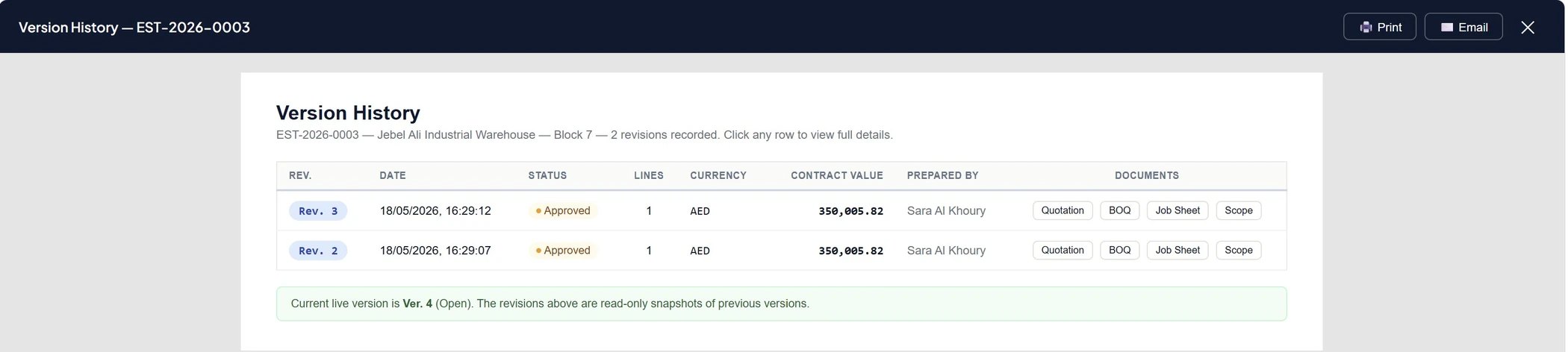
Revision Snapshots
Every Submit-for-Approval freezes a complete, read-only version: pricing, currency, markups, package mix, contract value and who prepared it. Older revisions stay exactly as they were, forever.
Field-Level Audit Logs
Beneath the revisions sits a continuous log of individual changes — which field, which user, which timestamp, and the old value → new value. The complete history, not just the milestones.
Estimation lifecycle
From first draft to a closed result, with approval as the gate before anything goes out.
Submitted for Approval→
Approved/
Change Request/
Rejected→
Won/
Lost
Enquiry Package lifecycle
From drafting an RFQ to awarding a subcontractor, with assessment and approval built in.
Sent to Bidders→
Bids Received→
Assessment Complete→
Submitted for Approval→
Approved→
Awarded→
Closed
Audit logging is configurable per entity — choose exactly which masters and transactions to track, and which actions to capture.
Create
New records are stamped with who created them and when, across the entities you enable.
Edit
Field-level change capture — the old value, the new value, the user and the timestamp.
Delete
Deletions are logged too, so nothing simply disappears without a trace.
Audit logging is toggleable per entity from System Administration, with a dedicated Audit Logs viewer for searching change history across the platform.
Someone makes a change
A rate is adjusted, a line is added, a markup is revised. BuildOps records the field, the user, the timestamp and both values — silently, with no extra clicks.
The estimate is submitted for approval
At that moment BuildOps freezes a full revision snapshot. Everything as it stood is preserved as a read-only version.
The trail is always there
Open any estimate to see its revisions side by side, drill into the audit log to see every change between them, and print or email a branded record of any version.
- Versioned snapshots on every submission
- Field-level audit log: who, what, when, old → new
- Side-by-side revision compare
- Branded, exportable record for ERP reconciliation